
Introducing Product Subscription Plan Comparison in Testpress LMS

Help students compare subscription plans, understand what they're paying for, and choose the right learning package with confidence.
TL;DR
Product Subscription Plan Comparison helps you showcase plan benefits clearly and makes it easier for students to choose the right subscription.
- Side-by-side plan comparison: Help students compare included and excluded benefits across subscription plans.
- Highlight premium benefits: Showcase mentorship, faculty support, study materials, and other offerings beyond courses.
- Easy benefit management: Add, edit, and organize product benefits in one place.
- Works with all products: Display benefits for products with or without subscription plans.
- Simplified purchase decisions: Help students compare benefits, pricing, courses, and validity before purchasing.
You're offering two subscription plans: Basic and Premium.
Both include courses, but Premium also offers live doubt-clearing sessions, mentorship, and printed study materials.
A student visits your store, compares the prices, and wonders why Premium costs more.
They can see the course names and subscription durations. But the additional support you've invested in? That's not immediately clear.
So they choose Basic. Or they contact your team for clarification. Or they leave without purchasing.
Sound familiar?
The problem isn't necessarily your pricing. It's that students can't see the full value behind each plan.
When students can't understand what they're getting, even a valuable subscription can feel expensive.
That's why we're introducing Product Subscription Plan Comparison in Testpress LMS, a clearer way to present your offerings and help students make informed purchase decisions.
What's New in Testpress LMS Subscription Plan Comparison?
The new feature lets institutes define product benefits and show exactly which benefits are included or excluded in each subscription plan.
Here's what's changing.
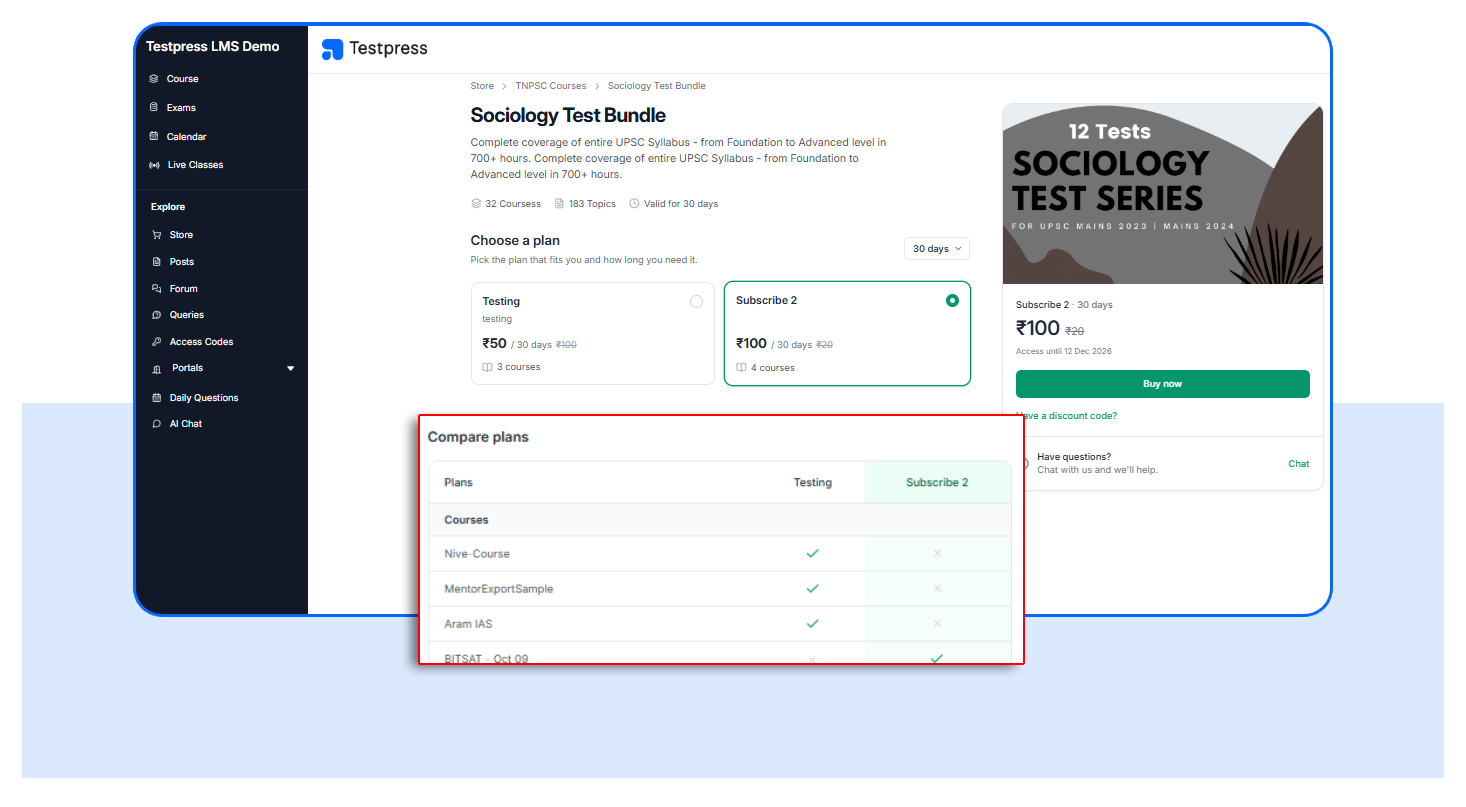
- Compare plans side by side: Students can instantly identify included benefits with green checkmarks and excluded benefits with grey crosses.
- Manage benefits in one place: Add, edit, delete, or reorder benefits once and configure which subscription plans include them.
- Display benefits without subscription plans: Showcase product benefits directly on the Store page, even for products without subscription plans.
- Keep existing purchase flows: Pricing, validity, course access, and checkout remain unchanged.
- Showcase all product benefits: Highlight offerings like mentorship, faculty support, live doubt-clearing sessions, and study materials, not just courses.
Why Subscription Plan Comparison Matters for Institutes and Students
Students shouldn't have to guess why one subscription plan costs more than another.
When the differences are clear, they can make better purchasing decisions, and institutes can communicate the full value of their offerings.
Here's how it helps:
- Make purchasing decisions easier: Students can compare benefits, prices, courses, and validity in one place.
- Highlight premium plan value: Show exactly what additional benefits students receive with higher-priced plans.
- Reduce purchase confusion: Help students understand what's included and excluded before paying.
- Simplify benefit management: Maintain a shared benefit list instead of updating the same information across multiple plans.
The result? Clearer subscription offerings, better-informed students, and a more straightforward purchasing experience.
How to Configure Product Benefits in Testpress LMS
Setting up your product benefits involves a few straightforward steps.
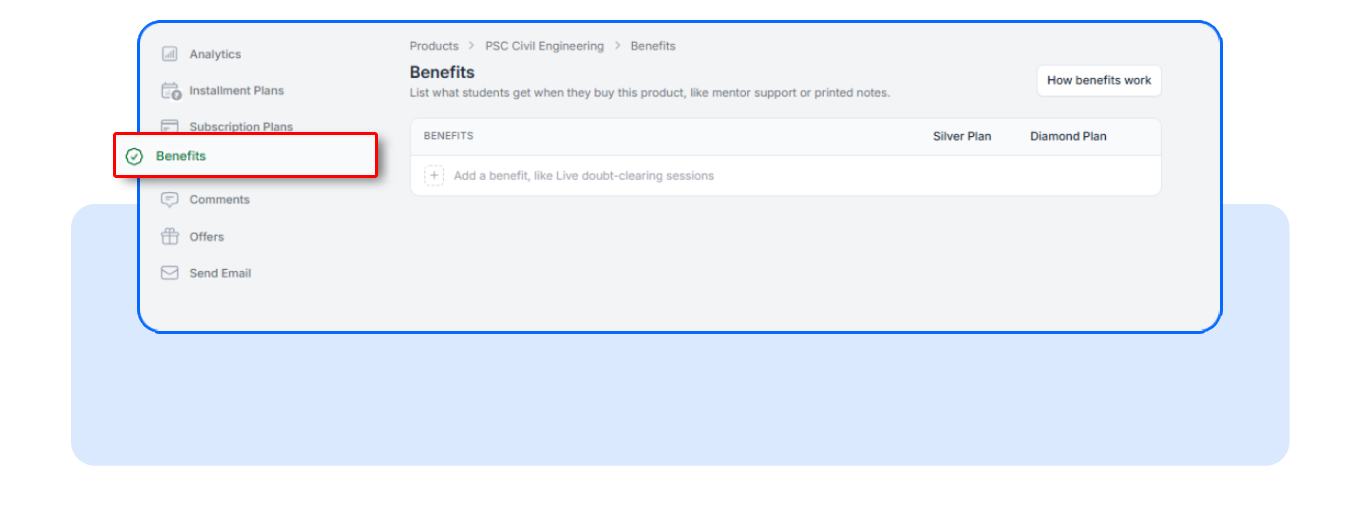
Step 1: Open Product Benefits
Navigate to the relevant product in your Testpress LMS administration interface.
Open the Product Benefits management section.
Here, you can manage the benefits associated with that product, whether or not you've created subscription plans.
Step 2: Add and Organize Your Benefits
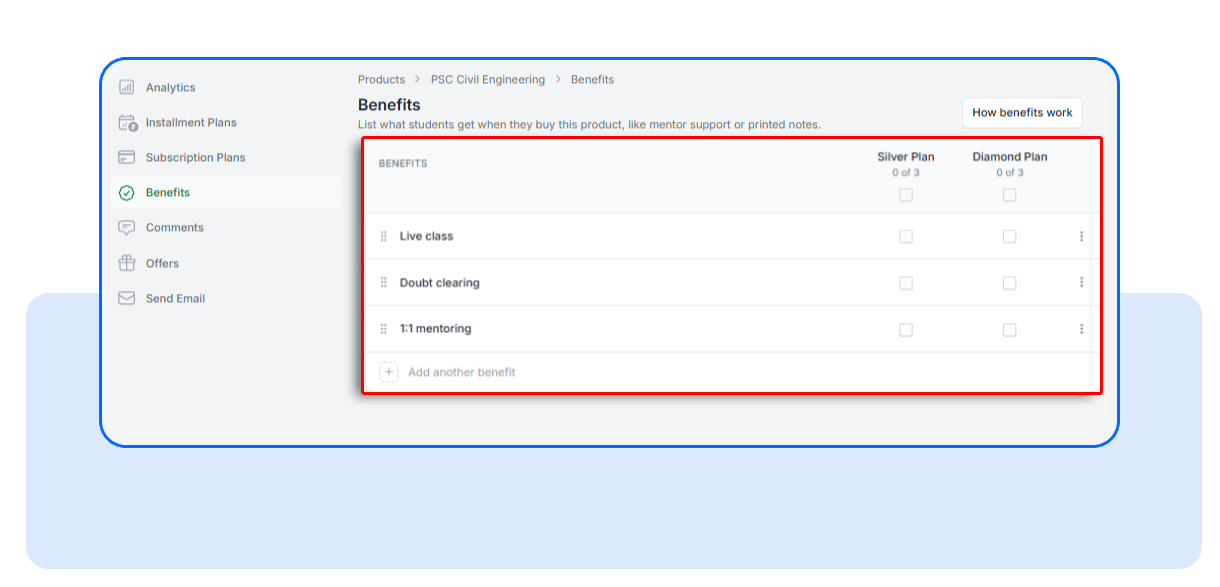
Enter descriptive names for the benefits your product offers.
For example:
- Live Doubt-Clearing Sessions
- Personal Mentorship
- Printed Study Materials
- Faculty Support
Arrange them in the order you want students to see.
Save your changes.
These benefits are now associated with the product and available for subscription plan configuration.
Step 3: Configure Benefits for Each Subscription Plan
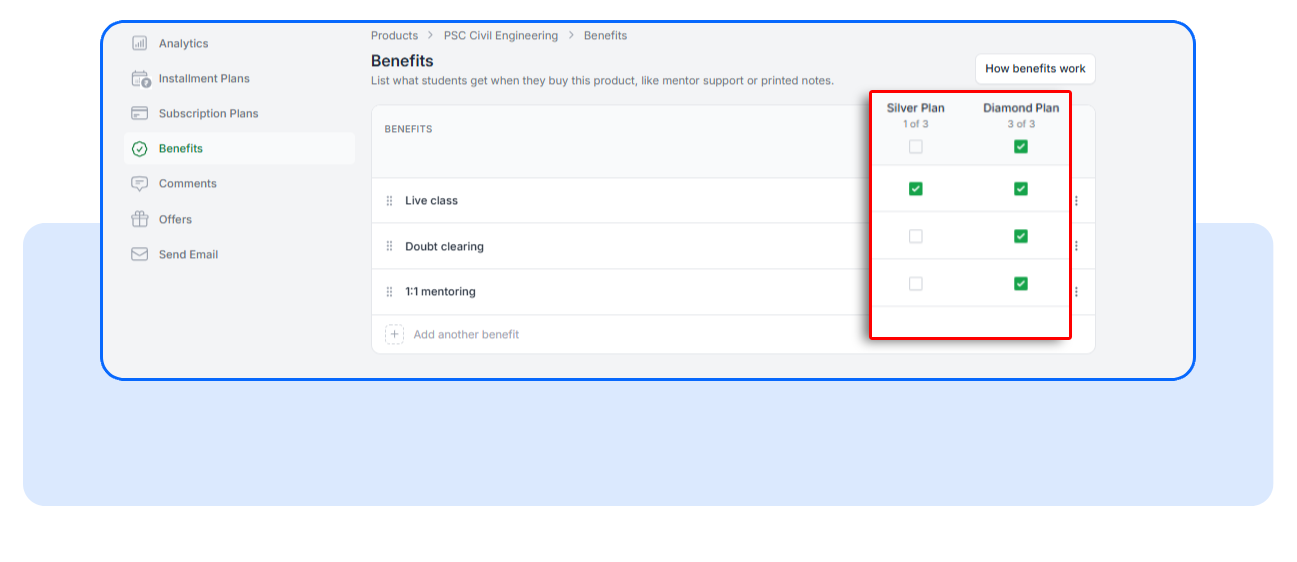
Open the subscription plan benefits configuration interface.
You'll see the shared product benefits available across your subscription plans.
For each plan, mark whether a benefit is included or excluded.
For example, you might include Live Doubt-Clearing Sessions in Premium but exclude it from Basic.
One detail worth knowing:
When you create a new benefit or subscription plan, the applicable benefits are initially marked as excluded.
You'll need to explicitly mark the benefits that each plan includes. Save and changes
Step 4: Let Students Compare and Select Their Plan
Once the benefits are configured, students can review the available plans and select the option that suits their needs.
They can choose an available pricing and validity option, select their preferred plan, and proceed through the existing checkout process.
No new purchasing workflow to learn.
Just clearer information at the point where students make their decision.
FAQs
Can I add product benefits without creating subscription plans?
Yes. Product Benefits can be created and managed independently of subscription plans. Yes. Product Benefits can be created and managed independently of subscription plans.
Will adding benefits change subscription pricing or course access?
No. Benefits are informational and do not modify pricing, validity, course access, or subscription entitlements. Your existing subscription configurations remain unchanged.
What happens if I don't configure any benefits?
Nothing changes for your students. Products without configured benefits continue to display the existing subscription plan selection interface. Products without subscription plans continue using their existing Store page layout without an empty benefits section.
Make Every Subscription Plan's Value Clear
You've invested time and resources into building learning packages that serve different student needs.
Those differences deserve to be visible.
With Product Subscription Plan Comparison, you can present your offerings more clearly, highlight the value of premium plans, and give students the information they need to choose confidently.
And you can do it without changing your existing pricing, course access, or checkout process.
Explore Product Benefits in your Testpress LMS product management interface, configure your plan benefits, and give students a clearer way to compare your subscription plans.